




Google's blind eye towards paid links:
Written by Search Engine Genie
@ 11:30 AM
permanent link on
Sunday, February 14, 2010
| Post a Comment |
1
comments


Yahoo is the only search engine which is serious about link buyers. Google seem to be never interested. They keep saying they want to fight it algorithmically and in this process they ban some innocent sites. Almost a year back our ranking got devalued because Google thought our widget links are paid links and devalued our rankings (https://www.searchenginegenie.com/widget/seo_statistics_widget.php ) .
More and more people resort to link buying these days. Almost all clients who come to us for SEO and have done SEO before have paid links to their site placed by previous SEO companies. So is automated detection working? I see it a big failure people just find innovative ways to hide links from Google's algorithmic detection and the result it hurts Google.
I expect Google to take more action on buying links since it hurts people like us who don't buy links. Our clients push us hard to buy links but still we stay away to stay within Google guidelines. If Google continues to show blind eye towards paid links companies like us too with resort to buying links since we don't have an ethical option to tackle aggressive competition.
Labels: Google Blog
Is Caffeine search results live?
Written by Search Engine Genie
@ 1:28 AM
permanent link on
Wednesday, February 10, 2010
| Post a Comment |
0
comments
We are expecting Caffeine results to be live because we had some cool ranking boost in that test datacenter
Labels: Google update
SEOs in twitter prosper
Written by Search Engine Genie
@ 10:15 AM
permanent link on
Monday, December 14, 2009
| Post a Comment |
4
comments
They have learned methods to use sites like twitter with lot of respect. I have seen some very good discussions in twitter between people in search engine industry. Some SEOs have 1000s of followers which itself is a very good sign for SEOs.
People are listing to the SEO guys and I have seen people like matt cutts, Adam lasnik follow some SEO guys. Matt cutts makes some interesting comments in his twitter account which is worth the read when you are in search engine industry.
He already has a whooping https://twitter.com/MattCutts number of followers ( 45,000 ) .
Its incredible since there are so many people who are active in this search and SEO industry. Today the awareness of people about search engines is huge. Only good SEO companies and SEO guys survive in this ever increasing competitive industry.
Other people to look out for in twitter are Danny Sullivan, Jeremy Zawodny and lot more. I don't recommend you block anyone who wants to follow you unless you feel they are really spammy. I have seen people having 100s of followers before seeing anyone spamming them.
Most SEOs feel twitter is a great neighbourhood. Even Pageoneresults ( Edward ) has named it twitterhood. Great to see SEOs use a great platform in a constructive way.
Labels: SEO
Do you really have a penalty
Written by Search Engine Genie
@ 12:31 PM
permanent link on
Tuesday, November 24, 2009
| Post a Comment |
2
comments
https://www.searchenginegenie.com/seo-problems.htm
So what really constitutes a penalty and do you really have one?
Here is a simple checklist to see whether you have a penalty or not.
Your site has been ranking for a long time but suddenly almost all the major keywords disappeared and only you rank for obscure keywords – YES you have one
Your URL is removed from search results and you cannot find your site on top even searching for your unique domain name itself – Yes you have a penalty.
If there is a notification in webmaster tools that your site is violating guidelines and has been removed – Yes you have one.
One particular keyword has been ranking for a long time but suddenly it moves beyond rank 100. Yes you have link penalty.
Sitelinks to your disappear when it used to be there before and a search for yourdomain.com without www doesn't bring up your site. But your site comes up when www is added to yourdomain.com. Yes you have a potential link buying / selling penalty.
If one keyword suddenly moves below 3 pages and never comes back even after 3 months. Yes it's what we call -30 penalty check the SEO problems page in the above link.
Penalties are not something we need to be worried. Even the worst penalties can be removed by explaining to Google. If you have trouble with your site don't hesitate to contact me and our team we will be ready to help you.
Labels: penalty
Caffeine update datacenter goes offline:
Written by seg
@ 9:33 PM
permanent link on
Wednesday, November 18, 2009
| Post a Comment |
0
comments
When i visit that URL i get this message:"Thank you! We appreciate all the feedback from people who searched on our Caffeine sandbox. Based on the success we've seen, we believe Caffeine is ready for a larger audience. Soon we will activate Caffeine more widely, beginning with one data center. This sandbox is no longer necessary and has been retired, but we appreciate the testing and positive input that webmasters and publishers have given."
Most of our sites and our client sites are doing exceptionally well in this particular datacenter and i am happy to see it go live. One particular client whom we have been doing work for about 2 years now is doing exceptionally well. I am sure he will be the happiest person to see his site do so well. I feel this update brings a lot of happiness among users.
Matt cutts says in his comments the delay for a full role out is because of the worry it will create on webmaster's mind. https://www.mattcutts.com/blog/google-caffeine-update/ I was just stunned to see a response like that from a senior Googler. Because Google gave a damn for anyone's website. I can remember back in 2003 when we had the great infamous Florida update it make lots of webmaster cry and even lot who depended on Google went out of Business. People were yelling but Google never cared. Good to see Google care for webmasters a lot these days.
Labels: Mattcutts
Pagerank update after a long wait:
Written by seg
@ 12:10 AM
permanent link on
Wednesday, November 11, 2009
| Post a Comment |
5
comments
Google is well aware of this PageRank obsession and they are doing their best to stop it. Recently Google removed PageRank from webmaster tools. They used to say which page is the most popular on your site every month in webmaster tools now they removed it from there. Just do a Google search
https://www.google.com/search?hl=en&source=hp&q=pagerank+removed&rlz=1R2GGLL_en&aq=f&oq=&aqi= and you will see how many blogs are talking about this news. Just a simple thing and people talk about it to the core. It just illustrates the importance of PageRank and its obsession on people's mind.
Now after a long time Google has updated its toolbar PageRank. You can see from this list ( https://www.searchenginegenie.com/google-toolbar-PageRank-update-list.html ) last PageRank update was end of June and this once has come after almost 4 months. That's virtually just 3 updates a year.
Before we used to have updates every 20 days. People just wait to see their green bar increase on Google toolbar. Now that has gone down since every site has to wait at least 4 months to get PageRank or see any update / upgrade / downgrade to their PageRank. I feel Google is doing the right thing by moving people away from PageRank obsession. I hope Google maintains the current trend.
Labels: pagerank update
New Sitelink-type links with meta descriptions on some searches
Written by seg
@ 11:03 PM
permanent link on
Wednesday, October 07, 2009
| Post a Comment |
2
comments
Google has recently made a lot of changes to their site links. When site links ( links that appear below the site when the domain name or other major name that the domain represents appears ) came into existence people thought its a weird thing. But now Yahoo, Bing both uses them copied from Google. Its an interesting way for people to find pages to a site they get a chance of multiple pages to be clicked from the search results itself. I have personally used site-links for a long time. Every one out of 2 times i have clicked a site link than the primary result. So yes as an active internet user i use sitelinks which i feel is a big achievement from Google. A trial has worked for them and we usually see tracking URLs in Sitelinks so even Google is monitoring the clicks on sitelinks.
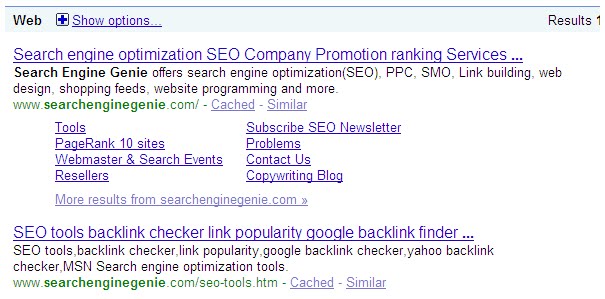
Today Google has improvised a lot when it comes site links. They came up with a site link similar to simple single line text links we see it visible these days. Take a look at the following example.
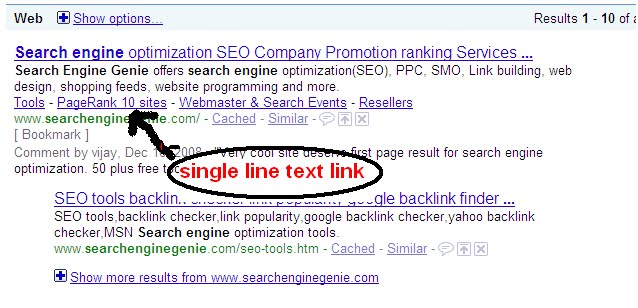 Now furthur improvization they are able to show actual links in descriptions it was not the case before. It shows how much effort Google is putting into their organic search too. They know Organic search is their primary area and they need to keep focusing on improving it. I am sure we can see a lot of improvization in future.

Great going Google keep it up.
Labels: link building, search engines
Influential women in Search industry - 7thpixel
Written by Search Engine Genie
@ 1:24 PM
permanent link on
Monday, September 07, 2009
| Post a Comment |
1
comments
Here is the list according to them, check their Most influential women post here
Alex Bennert
In-house SEO, Wall Street Journal
Allison Fabella
SEO Manager, Atlanta Journal-Constitution
Amanda Watlington
Ph.D., Searching for Profit
Anne Kennedy
Managing Partner, Beyond Ink
Christine Churchill
President, KeyRelevance
Dana Todd
Founding Partner, SiteLab International, Inc.
Elisabeth Osmeloski
Managing Editor, Search Engine Land
Gillian Muessig
President, SEOmoz, Inc.
Heather Lloyd-Martin
President and CEO, SuccessWorks
Janet Driscoll Miller
President & CEO, Search Mojo
Jennifer Laycock
Director of Social Media/Editor, SiteLogic/Search Engine Guide
Jessica L Bowman
Founder & President, SEOinhouse.com
Jessie Stricchiola
Founder & CEO, Alchemist Media, Inc.
Jill Whalen
CEO, High Rankings
Kim Krause Berg
Web Site Usability and SEO Consultant, Cre8pc
Rae Hoffman
Chief Executive Officer, Outspoken Media
Rebecca Kelly
Director of Social Media, 10e20
Rhea Drysdale
Co-founder and COO, Outspoken Media
Shari Thurow
SEO Director, Omni Marketing Interactive
Tamar Weinberg
Techipedia.com
Vanessa Fox
Founder, Nine By Blue
Labels: SEO people
Top 10 Most Influential Websites In SEO
Written by Jennifer
@ 3:28 AM
permanent link on
Friday, September 04, 2009
| Post a Comment |
8
comments
Sphinn is a social site for search and interactive marketers. It's designed to allow you to share and discover news stories, read and take part in discussions, discover events of interest and network with others.

Search Engine Watch
Search Engine Watch provides instructions and information about searching the web, analysis of the search engine industry and help to site owners trying to improve their ability to be found in search engines.
Search Engine Land
Search Engine Land is a news and information site covering search engine marketing, searching issues and the search engine industry.
The site is led by journalist Danny Sullivan, who has been covering search for the past 11 years. It is published by Third Door Media, which also produces the Search Marketing Expo conference series and the Search Marketing Now webcast events.

SEO Book
SEO Book offers marketing tips, search analysis, online business tips, and general commentary on the evolution of the web.
Launched in 2003, it has one of the oldest standing SEO sites that is still regularly updated. The site originally was designed as a blog that offered DIY SEO tips and helped sell the leading SEO e-book, which had sold well over $1,000,000 in volume.

SEOmoz
SEOmoz provides the web's best community, tools and educational resources for people and companies engaged in Internet marketing and search engine optimization.

Search Engine Journal
The two main criteria required for successful internet marketing is search engine optimization and search engine marketing. Search Engine Journal, established in 2003, is a 6 year old publication of Search & Social Media, LLC, which specializes in a community approach to the reporting of search engine news & the sharing of Search Engine Marketing knowledge & tactics.

SEOChat
is a service which is run by reputed SEO Company. SEO chat provides quality resources related to SEO, Link Building, Directory Submission, SEO Articles, Promotion Guide, Marketing Tutorial Resources etc.

Digitalpoint
Digitalpoint provides you with a weekly or daily off-site backup service for your mission critical databases. They also provide Database design and security consulting services, Database Hosting, Data Conversion, Seminars and Training.

Search Engine Guide
Searchengineguide is an educational web site aimed at translating the search marketing world into something that small business owners can understand. Search Engine Guide is divided into four primary areas Search Engine News, Search Engine Marketing, Internet Search Engines, Search Engine Books & Services.

Submit Express
Submit Express has helped thousands of companies with their search engine marketing (SEM) needs, from search engine submission to search engine optimization (SEO). To date, Submit Express has provided SEO service to over 5,000 companies and premium search engine submission service to over 25,000 companies. Submit Express also offers Pay-Per-Click (PPC) advertising and Opt-in Email Advertising.

Labels: SEO
Top 10 Influential People In Search Engine And Search Engine Optimization Industry
Written by Jennifer
@ 1:39 AM
permanent link on
| Post a Comment |
11
comments
| Matt Cutts | ||
| Matt Cutts joined Google as a software engineer in January 2000 and currently he is the head of Google's Web spam team. Before joining Google, he worked on his Ph.D. in computer graphics at the University of North Carolina at Chapel Hill. He has done M.S. from UNC-Chapel Hill, and B.S. degrees in both mathematics and computer science from the University of Kentucky. He wrote the first version of Safe Search, which is Google's family filter, and he has worked on search quality and web spam at Google for the last several years. |  | |
| Danny Sullivan | ||
Danny Sullivan is the editor-in-chief of Search Engine Land, a blog that deals with news and information about search engines, and search marketing. He graduated from the University of California, Irvine and for a year he was in England working for the BBC. Sullivan started Search Engine Watch in beginning of June 1997. Search Engine Watch was a website with guidelines on how to get good search engine results. Matt Cutts of Google considered Search Engine Watch as "must reading," and Tim Mayer of Yahoo! as the "most authoritative source on search". Search Engine Land is a news web site that deals with search engine marketing and search engine optimization. It was founded in 2006 by Sullivan after he left Search Engine Watch. |  | |
| Brett Tabke | ||
Brett Tabke is an American programmer and SEO professional. Brett Tabke has worked in the computer industry for almost three decades. Tabke is at present the CEO and founder of Webmaster World Inc. He is also the founder of PHD Software Systems, a specialty software manufacture that produced a line of software for Commodore computers in the 80's and 90's. Tabke gave several SEO staples as "Link Farm", "SEO Themes", and the classic "SERP" (Search Engine Results Page). He was also a founding board member of SEMPO. He also wrote a chapter for the best selling "Google Hacks" book. He is also the first identified person to have fully decoded the Excite and most of the Altavista search engine algos. Tabke's document "26 Steps to 15k a Day" is one of the most widely read in SEO history. |  | |
| Shawn Hogan | ||
| Shawn Hogan is currently the President and CEO of Digital Point Solutions. He is also a very good programmer, analyst, technical writer and artist. However, around these parts he's perhaps better known as digitalpoint, webmaster of the DigitalPoint Forum. In the world of eCommerce, Shawn is known for numerous things, not the least of which is his very popular SEO Tools. These extremely regarded tools are accessible free of charge and belong in the arsenal of every serious webmaster, including forum owners and administrators. |  | |
| Aaron Matthew Wall | ||
| Aaron Matthew Wall a, California-based blogger and search engine optimization expert who writes the popular blog SEOBook. He is a recurrent speaker at the Search Engine Strategies and PubCon conferences. |  | |
| Rand Fishkin | ||
| Rand Fishkin is the CEO and Co-Founder of SEOmoz, a head in the field of search engine optimization tools, resources & community. In 2009, he was called among the 30 Best Young Tech Entrepreneurs below 30 by Business Week, and has been written about it in The Seattle Times, Newsweek and the NY Times among others. Rand has keynoted conferences on search from Sydney to Reykjavik, Montreal to Munich and spoken at dozens of shows around the world. He's predominantly passionate about the SEOmoz blog, read by more than 40,000 search professionals each day. |  | |
| Michael Grey | ||
| Michael Grey, another man "in the know" when it deals about Search Engine Optimization. He blogs on the subject of SEO at Graywolf's SEO Blog. He is a SEO although he does work in a lot of different areas of internet marketing. He has traditional SEO projects and works as well as managing his own PPC campaigns for some affiliate products and a few e-Books which he sells. |  | |
| Loren Baker | ||
| Loren Baker is a graduate in Mass Communications (marketing and advertising) from Towson University seems to do good justice to his graduation by entering into Search Engine marketing. His interest in SEO and web world made him the Director of Search Engine Marketing in his same organization, WebAdvantage.net where he managed Search Engine Marketing and SEO team. And with the his learning and experiences, in July 2003, he launched his own Search Engine Journal where he is the editor now. |  | |
| Darrin J.Ward | ||
Darrin J. Ward leads the Darrin Ward team, a group of SEO & SEM professionals that propose top-tier professional SEO and search marketing services. Darrin has been greatly involved in the SEO industry since day one. Darrin has founded a number of successful SEO and search related Websites and search companies. |  | |
| Jeremy Zawodny | ||
| Jeremy Zawodny is currently a Technology Evangelist at Yahoo. Formerly he was part of Yahoo's platform engineering group. He's been at Yahoo ever since then, helping to put MySQL and other Open Source technologies to use in amusing, interesting, and often very big ways. In 2000, he started writing for Linux Magazine and continues to do so today as a columnist and contributing editor. |  |
Labels: Search Engine Cartoons, SEO, seo cartoons